Invoice extraction on digital PDFs and scans
Compare text extraction and OCR on two fictional invoices. Both routes preserved the totals on the digital PDFs. Only a line-item check exposed the wrong unit price on a scan.
· AI Superpower
What we found
Poppler recovered 24 of 24 primary fields on native PDFs and 0 of 24 on scans. Tesseract recovered all 48 primary fields but misread one of eight unit prices.
AI Superpower field test · November 22, 2026
What happened
Two fictional invoices each had a native PDF and an image-only PDF containing the same visible page. We tried Poppler pdftotext and Tesseract on all four files. Both run locally. There was no vendor account, cloud transfer, or per-page API charge in this run.
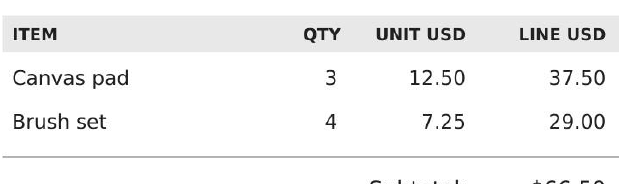
The text-layer route recovered every requested field in the two native PDFs. On both scans it returned only a page-break character. Tesseract recovered all 48 scored fields, including one blank purchase-order number in both representations. A separate unit-price check exposed a consequential error in the studio scan. Tesseract transcribed four brush sets at $4.25 apiece even though the printed price was $7.25. The $29 line total and $70.49 invoice total both survived.
| Fixture | pdftotext, core fields | Tesseract, core fields | pdftotext, median | Tesseract, median |
|---|---|---|---|---|
| Paper supplies, native | 12/12 | 12/12 | 20.1 ms | 896.0 ms |
| Paper supplies, image only | 0/12 | 12/12 | 13.4 ms | 1,199.2 ms |
| Studio goods, native | 12/12 | 12/12 | 16.0 ms | 817.3 ms |
| Studio goods, image only | 0/12 | 12/12 | 14.8 ms | 1,154.5 ms |
After the primary run, we audited both unit-price cells for every tool and input. Poppler preserved four of eight across the four files and Tesseract preserved seven of eight. All four of Poppler's misses came from the two scans. Tesseract's other visible recognition differences included the decorative masthead, which was outside both scoring sheets.
Work the example
- Open
inputs/studio-scan.pdfand the matchingoutputs/studio-scan-tesseract.txt. Locate the Brush set row. - Multiply the extracted quantity, four, by the extracted unit price, $4.25. The result is $17.00. The printed and extracted line total is $29.00.
- Inspect the unit price on the source page. It is $7.25. Recalculate 4 × $7.25 = $29.00. Keep the raw text and record the correction separately. The crop in
invoice-studio-scan-detail.pngshows the source without annotations. - Check the blank purchase-order field on
inputs/paper-scan.pdf. A visible label with no value should produce null. A tool returning an empty page has supplied no evidence for any field.
A timed AI-assisted recheck of the already-flagged Brush set cell took 7.4 seconds from the source crop and OCR row being displayed to the recorded repair. Initial discovery, cropping and the rest of the invoice review were outside that interval. Human correction time was unmeasured. See correction.json.
How the run worked
The 12 primary fields were supplier, invoice number, issue date, due date, purchase order, subtotal, tax, total due, and the quantity and line amount for each of two items. Both routes used the same field parser with known labels and item descriptions. It compares trimmed values, strips the dollar sign on summary fields and preserves punctuation. A blank purchase-order label gets null. An absent label stays missing. Each field has equal weight. The separate audit adds two unit prices per page and checks quantity × price against the extracted line amount.
The native PDFs have selectable text and embedded DejaVu Sans fonts. Their scanned counterparts were made by rasterizing the same native pages at 140 dpi in grayscale, applying JPEG quality 70 and embedding each image as the entire page. These are simulated scans of one template with two different sets of values. They cover neither photos, handwriting, skewed pages nor unfamiliar invoice layouts.
Poppler pdftotext 25.03.0 ran in layout-preserving UTF-8 mode. The Tesseract route rendered every PDF with pdftoppm 26.05.0 at 300 dpi, then ran Tesseract 5.5.0 with English language data and page segmentation mode 6. We ran each route three times and stored the median wall-clock time plus the three measurements. All repeats of each tool/file pair returned identical raw text. OCR timings include rendering. Both routes exclude the parser, installation and review time. A small two-document sample supports a check on this workflow, rather than a general accuracy estimate for invoice OCR.
Reproduce
Use Python 3 with ReportLab 4.4.9 and Pillow 13.0.0. Install Poppler and Tesseract with English language data on PATH. To rerun extraction without regenerating the PDFs:
python invoice_trial.py --existing
python audit_units.py
To rebuild the inputs too, run python invoice_trial.py without --existing. It looks for DejaVuSans.ttf and DejaVuSans-Bold.ttf in /usr/share/fonts/truetype/dejavu. Set INVOICE_FONT_DIR if your font directory differs. Tool versions, engine language data, hardware and load can change accuracy or timing. Running the scripts replaces the result files in your extracted working copy. Keep a copy of the published archive if you want to compare runs.
Files include four original practice inputs, the answer key, raw text from each route, machine-readable field results and timings, the unit-price audit, and the worked correction. The SHA-256 manifest identifies the published inputs.
- Poppler project: https://poppler.freedesktop.org/
- pdftotext usage: https://manpages.debian.org/bookworm/poppler-utils/pdftotext.1.en.html
- Tesseract project: https://github.com/tesseract-ocr/tesseract
Repeat this comparison
Download the shared inputs, original outputs, scorecard and reproduction notes.
Get the test files